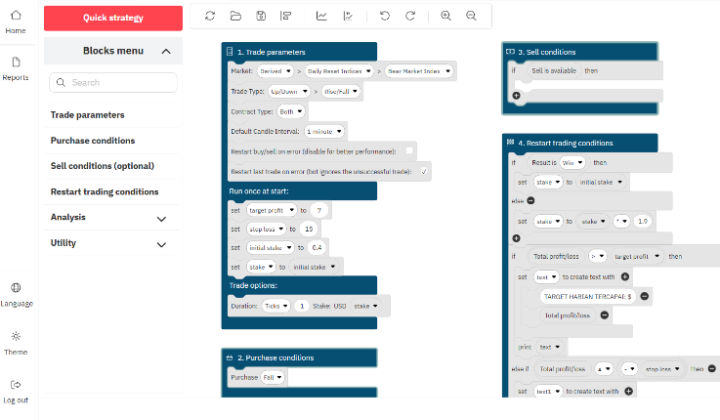

Automated trading on Deriv doesn’t have to be complicated. If you are looking for a straightforward, lightweight XML script to automate your digit-based strategies, the Dandelion Digit Bot is a solid option to test.
Free Download: Dandelion Digit Bot for Deriv DBot XML
In this guide, we break down how the Dandelion Digit Bot works, its core setup parameters, and step-by-step instructions to load and run the .xml file safely on Deriv’s DBot platform.
What is the Dandelion Digit Bot?
The Dandelion Digit Bot is a free XML trading script built specifically for Deriv’s Synthetic Indices (such as Volatility 10, 25, 50, 75, or 100 Index).
Instead of watching charts for hours, this bot continuously analyzes tick data and last-digit patterns to execute automated trades based on pre-set conditions. It is ideal for traders who prefer fast-paced digit options like Digit Differ, Digit Match, or Over/Under.

Key Features
-
Zero Coding Required: Upload the
.xmlfile directly into DBot and start testing right away. -
Fully Customizable Parameters: Easily adjust your stake amount, target profit, and stop-loss limits.
-
Fast Execution: Built for low-latency tick processing on Synthetic Indices.
-
Risk Controls Built-In: Allows you to configure Martingale multipliers or fixed-stake strategies.
Bot Parameters & Recommended Setup
Before running any bot on a real balance, setting up your money management parameters correctly is crucial. Here is the recommended configuration for testing the Dandelion Digit Bot:
| Setting | Recommended Value | Notes |
| Market / Asset | Volatility 10 (1s) or 100 Index | Higher tick frequency yields faster execution. |
| Trade Type | Digits (Differ / Over-Under) | Adjust according to your preferred risk tolerance. |
| Initial Stake | $0.35 – $1.00 | Start with the minimum stake allowed by Deriv. |
| Target Profit | 2% – 5% of balance per session | Keep session goals small to prevent over-trading. |
| Stop Loss | 10% – 15% of balance | Always set a hard limit to protect your capital. |
How to Download and Run the Dandelion Digit Bot on Deriv DBot
Follow these simple steps to import and run the XML script:
Step 1: Download the File
Click the button below to download the XML file directly to your device:
📥 Download Dandelion Digit Bot XML Free (Direct Download Link)
Step 2: Open Deriv DBot
-
Log in to your Deriv Account.
-
Navigate to the top-left menu and select DBot (or visit
dbot.deriv.com).
Step 3: Import the XML File
-
On the DBot workspace, click the Folder icon (Import) located on the top toolbar.
-
Select Local and upload the
dandelion-digit-bot.xmlfile you just downloaded. -
Once loaded, you will see the block structure appear on your workspace.
Step 4: Adjust Settings & Run
-
Review the input variables (Target Profit, Stop Loss, Stake Amount).
-
Switch your account mode to Demo Account.
-
Click the green Run button at the top right to start automated trading.
Important Safety Tips for Automated Trading
-
Test on Demo First: Never run a new XML bot on a live account immediately. Run the bot through multiple sessions on a Demo account to observe its behavior during different market conditions.
-
Avoid Continuous Running: Automated bots are designed for short trading sessions. Set a clear profit target, stop the bot once reached, and take a break.
-
Control Your Martingale: If you enable stake recovery (Martingale), ensure your balance can withstand consecutive losses without blowing up your account.
Frequently Asked Questions (FAQ)
Is the Dandelion Digit Bot completely free?
Yes. The XML file is 100% free to download and use on your Deriv DBot platform.
Can I run this bot on mobile devices?
Yes, you can access dbot.deriv.com via a browser on your smartphone or tablet, import the XML file, and run the bot just like on a desktop.
Does this bot guarantee profit?
No. Financial market trading involves risk, and no trading bot can guarantee risk-free profits. Always practice proper money management and trade responsibly.