
The Late-Night Struggle and the Search for Automation
I remember sitting in front of my dual-monitor setup back in 2022, eyes bloodshot and heart racing every time a candle flickered on the 1-minute chart. I was chasing the MACD crossover, that classic signal where the fast line leaps over the slow line, promising a trend reversal. But as any trader knows, being glued to the screen for eight hours is a recipe for bad decisions. Human fatigue is the number one killer of trading accounts. That is exactly why I started looking for a macd crossover dbot script free of the usual complexities and high costs.
Fast forward to 2026, and the landscape has changed. Markets are faster, volatility is more erratic, and manual execution feels like trying to win a Formula 1 race on a bicycle. If you are using Deriv or the legacy Binary.com platform, you have probably heard of DBot. It is a visual programming interface that allows you to automate strategies without writing a single line of traditional code like Python or C++. Today, I want to walk you through how to set up your own script, why the MACD still reigns supreme, and how to keep your capital safe while the bot does the heavy lifting.
Why the MACD Still Matters in 2026
You might think that in a world of AI-driven neural networks and high-frequency algorithms, a tool developed in the late 70s would be obsolete. You would be wrong. The Moving Average Convergence Divergence (MACD) remains a staple because it measures both momentum and trend direction. It tells us when a trend is getting exhausted and when a new one is gathering steam.
In a typical crossover strategy, we are looking for two things:
- The Bullish Cross: The MACD line crosses above the Signal line. This suggests it is time to look for ‘Rise’ or ‘Call’ opportunities.
- The Bearish Cross: The MACD line crosses below the Signal line. This indicates a downward shift, perfect for ‘Fall’ or ‘Put’ trades.
The beauty of using a macd crossover dbot script free is that the bot does not get tired. It doesn’t get “gut feelings.” It doesn’t try to revenge trade after a loss. It simply sees the crossover and executes.

Building the Logic: How to Structure Your DBot Script
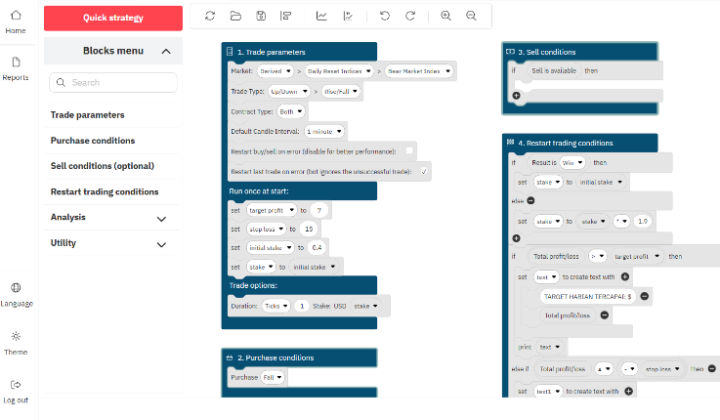
When you open the DBot dashboard, it can look a bit intimidating with all those colored blocks. But building a MACD script is actually quite logical once you break it down into four main blocks. Let’s talk through the construction process as if we were building a Lego set.
Step 1: The Trade Parameters (Block 1)
This is where you define your market. Are you trading Volatility 75 (V75)? Or maybe the 100 Index? In 2026, many traders prefer the Synthetic Indices because they are active 24/7 and aren’t affected by global news events like a sudden interest rate hike in the US. Set your stake—let’s say $1—and choose your duration. For MACD, I find that 5-tick or 1-minute durations work best to capture the immediate momentum after a cross.
Step 2: Defining the Indicators (The Math)
Inside the “Purchase Conditions” block, you need to tell the bot to look at the MACD. You will drag out the MACD block and set the standard parameters: 12 (Fast EMA), 26 (Slow EMA), and 9 (Signal Period). The bot needs to compare the *current* state of these lines with the *previous* candle. This is the secret to detecting a cross. A cross only happens if, in the previous candle, the MACD was below the signal, but in the current candle, it is above.
Step 3: The Execution Logic (Block 2)
This is the “If/Then” part of your brain. You want to tell the bot: “IF the MACD Line is greater than the Signal Line AND the previous MACD Line was less than the previous Signal Line, THEN Purchase Rise.” It sounds wordy, but in DBot, it is just a few blocks snapped together. You do the exact opposite for the Fall condition.
The Myth of the “Magic Script”
Let’s have a real talk for a second. There is no such thing as a 100% win-rate script. If someone tries to sell you a macd crossover dbot script free of losses, they are lying. The MACD is a lagging indicator. It tells you what has already started happening. In ranging or sideways markets, the MACD will “whipsaw” you—meaning it crosses back and forth constantly, leading to several small losses in a row.
To survive these periods, you need to add filters. Maybe you only trade the MACD cross if it happens below the zero line for a buy, or above the zero line for a sell. This ensures you are buying when the asset is “oversold” in relative terms.

Advanced Tweaks for 2026 Market Volatility
By now, you’ve probably noticed that the markets feel different than they did a few years ago. Algorithms are sharper. To keep your macd crossover dbot script free from being outplayed, consider these optimizations:
Integrating a Trend Filter
Never trade against the big trend. I like to add a 200-period Exponential Moving Average (EMA) to my script. If the price is above the 200 EMA, the bot is only allowed to take Bullish MACD crosses. If the price is below, it only takes Bearish crosses. This one simple tweak can improve your win rate by 15-20% because it keeps you on the right side of the institutional flow.
Dynamic Stake Management
Most free scripts come with a basic Martingale system (doubling the stake after a loss). While Martingale is popular, it is a double-edged sword. In 2026, I recommend a “Limited Martingale” or a D’Alembert strategy. Set a max level—say, 4 or 5 steps. If the bot loses 5 times in a row, it resets to the base stake instead of blowing the whole account. It’s better to lose $30 today and live to trade tomorrow than to lose $1,000 in a single runaway streak.
Setting Up Your Workspace
If you are new to this, here is a quick checklist to get your environment ready:
- Use a Virtual Account First: Never, ever run a new script on your real money account immediately. Give it at least 100 trades on the demo/virtual account to see how it handles different market cycles.
- Check Your Internet Stability: DBot runs in the browser. If your internet cuts out, the bot might miss a ‘Sell’ trigger or fail to clear a Martingale step. If you’re serious, look into a cheap VPS (Virtual Private Server).
- Timeframes Matter: MACD on a 1-minute chart is very noisy. MACD on a 5-minute or 15-minute chart is much more reliable, though you will get fewer trades.
Common Pitfalls to Avoid
I’ve seen dozens of traders fail with a macd crossover dbot script free because they fell into the same traps. Don’t let these be you:
- Over-optimizing: Don’t try to find the “perfect” settings (like 13, 27, 10). Stick to the defaults unless you have a very specific reason to change them. The defaults work because everyone else is looking at them too, creating a self-fulfilling prophecy.
- Running it 24/7: Even though the bot can run all day, the market isn’t always suitable. If you see the price moving sideways in a tight range, turn the bot off. MACD hates ranges.
- Ignoring the News: Even on synthetic indices, there are times of higher “algorithmic volatility.” If your bot is losing more than usual, just take a break.
The Psychology of Automated Trading
The hardest part of using a macd crossover dbot script free isn’t the technical setup—it’s the psychological discipline. You will have days where the bot wins 10 trades in a row, and you will feel like a genius. You’ll be tempted to increase the stake. Don’t.
Then you will have days where the bot loses 5 in a row, and you will want to step in and trade manually to “fix” it. Usually, that’s when you make things worse. The point of automation is to remove you from the equation. Set your Stop Loss and Take Profit levels in the script, and then walk away from the computer. Go for a walk, grab a coffee, or read a book. The bot is there to give you back your time.
Where to Find and Download Scripts
While I encourage you to build your own so you understand the logic, there are many communities where you can find a macd crossover dbot script free of charge. Look for GitHub repositories or dedicated trading forums. When you download an XML or JSON file for DBot, simply go to the “Import” button in the bot dashboard and load it up.
Always check the logic after importing. Make sure there aren’t hidden “hidden fees” or weird logic blocks that send trades to a different account (it’s rare, but be safe). Verify that the Martingale factors and the indicators are set exactly how you want them.
Looking Ahead: The Future of DBot
As we move through 2026, I expect to see even more integration between DBot and external signals like TradingView alerts. Imagine your macd crossover dbot script free combined with the power of TradingView’s advanced charting. The possibilities are expanding, but the core principle remains: find a strategy with an edge, manage your risk, and let the machine handle the execution.
Trading is a journey, not a sprint. Automation is a tool in your belt, not a magic wand. By understanding the MACD crossover and how to translate it into a script, you are already miles ahead of the average retail trader who is still clicking buttons based on a “feeling.” Stay disciplined, keep testing, and let the data guide your path to profitability.