
Finding a trading strategy that works smoothly on Deriv often comes down to picking the right tool for the current market direction. If you prefer trading with the prevailing trend rather than fighting it, the Bull & Bear Trend Auto Bot provides a straightforward approach.
Bull & Bear Trend Auto Bot for Deriv DBot: A Practical XML Strategy Guide
Instead of running a single bot blindly, this system uses two specialized XML files: one for uptrends (Bull Bot) and one for downtrends (Bear Bot).
Here is a breakdown of how this trend-following strategy works, how to set up your account, and how to control your risk.
How the Bull & Bear Strategy Works
Synthetic indices on Deriv frequently form clear micro-trends. This setup takes advantage of those momentum shifts by using dedicated rules for each direction:
-
Bull Bot: Designed strictly for uptrends. It scans for higher highs and only places Rise / Buy contracts.
-
Bear Bot: Designed strictly for downtrends. It scans for lower lows and only places Fall / Sell contracts.
Why Separate the Bots?
Running a bidirectional bot in a strong directional market often leads to unnecessary losses. By checking the chart beforehand and launching the matching bot (Bull or Bear), you trade in line with momentum rather than against it.
How to Set Up and Run the Bot
Getting started takes just a few steps:
-
Create an Account: If you don’t have one yet, register a free account on the official Deriv Registration Page.
-
Open DBot: Head over to
bot.deriv.comand log in. -
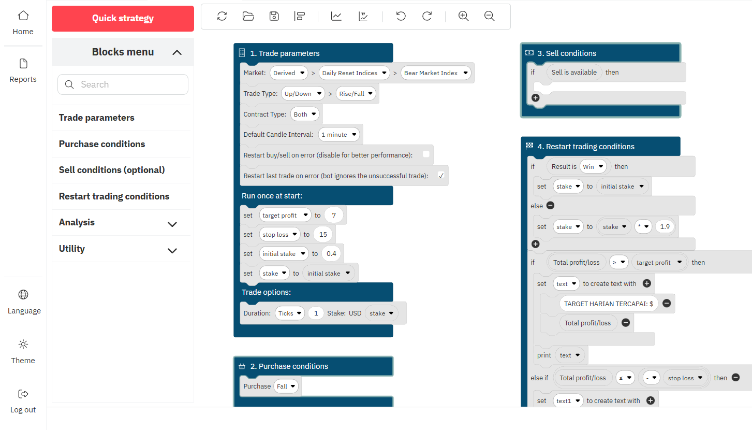
Upload the XML File: Click the Folder icon in the top toolbar, select Local, and load either the Bull or Bear
.xmlfile depending on market direction. -
Adjust Your Parameters: Set your initial stake, profit target, and stop loss.
-
Test on Demo: Switch to your Demo account first and click Run to see how the bot behaves.
Recommended Bot Settings & Risk Management
While this strategy aims for steady returns, automated trading always carries risk. Here are the baseline settings to keep your account safe:
| Parameter | Recommended Value | Notes |
| Minimum Balance | $25 – $50 | $50 provides a safer cushion for recovery steps. |
| Initial Stake | $0.35 | Start with the minimum stake allowed by Deriv. |
| Target Profit | $2 – $5 (2% – 5%) | Stop the bot once you reach this goal per session. |
| Stop Loss | $10 – $20 | Hard limit to protect your capital if the trend flips. |
| Max Martingale Steps | 4 – 5 steps max | Cap recovery steps to avoid draining your balance. |
Important Rules for Safe Trading
-
Check the Chart First: Spend a minute looking at the market trend on Deriv before hitting start. If price is moving upward, load the Bull Bot. If it is dropping, load the Bear Bot. If the market is moving sideways, wait for a clearer trend to form.
-
Monitor Martingale Multipliers: When the bot encounters a loss, it doubles the next stake to recover the drawdown. Keep a close eye on the bot during losing streaks and do not let Martingale run uncapped.
-
Take Session Breaks: Aim for small, consistent gains (2% to 5% per session) rather than leaving the bot running for hours. Once you hit your target, turn off the bot and enjoy your day.
Frequently Asked Questions
Which market works best for this bot?
Smoother synthetic indices like Volatility 10 or Volatility 25 Index often show cleaner micro-trends for this setup.
What should I do if the market reverses mid-session?
If the trend shifts against your active bot (e.g., an uptrend turns into a steep drop while running the Bull Bot), stop the bot immediately. Re-evaluate the chart before switching to the Bear Bot.
Can I test this without risking real money?
Yes. Every Deriv account includes a $10,000 Demo balance so you can upload and test these XML scripts risk-free.