
Getting Your Hands Dirty with Automation
I remember the first time I sat down to automate my trading strategy. It was late, I had three cups of coffee in me, and I was convinced I was one click away from financial freedom. But then, I hit a wall. A technical, annoying wall called the API connection. If you are here, you probably know that feeling. You have built a logic in your head, or maybe even mapped out the blocks in the workspace, but your bot is essentially a car without a key until you handle the deriv api token for dbot setup.
Think of the API token as the digital handshake between your account and the trading engine. Without it, DBot is just a pretty interface with no power to execute trades on your behalf. In 2026, security protocols have become tighter, and while that is great for your funds, it means we have to be a bit more precise about how we generate and use these keys. Let’s walk through this together, step by step, so you can get back to the actual trading part.
Why You Need a Specific API Token for DBot
You might wonder why we can’t just use our login password. Well, in the world of modern web architecture, giving an automated script your password is like giving a valet the keys to your entire house just because you want him to park your car. An API token is different. It is a scoped key. It tells Deriv exactly what the bot is allowed to do and, more importantly, what it is not allowed to do.
When you are configuring your deriv api token for dbot setup, you are essentially creating a restricted permission slip. You can allow the bot to read your balance and place trades, but you can strictly forbid it from withdrawing your hard-earned money. This layer of abstraction is your best friend when things get technical.
The Difference Between Scopes
Before we jump into the dashboard, we need to talk about ‘Scopes.’ If you select the wrong ones, your bot will either fail to start or have too much access. Generally, for a standard DBot setup, you are looking at three main permissions:
- Read: This allows the bot to see your balance, your trade history, and the current market prices.
- Trade: This is the big one. It lets the bot open and close positions based on your logic.
- Trading Information: This gives the bot the ability to view your active trades and their current status.
I usually avoid checking the ‘Admin’ or ‘Payments’ boxes for a bot. There is simply no reason for a trading script to have the power to change your password or move money out of your account to a third party. Keep it lean, keep it safe.
Step-by-Step: Generating Your Deriv API Token for DBot Setup
Let’s get into the actual dashboard. The interface in 2026 is sleek, but the core settings are still tucked away where you’d expect them. Follow these steps, and don’t skip the naming part—it will save you a headache later when you have ten different tokens for different experiments.
1. Accessing the API Management Screen
Log into your Deriv account. Once you are in the main trading area, look for your account settings or the ‘Manage’ tab. You are looking for a section labeled ‘API Token’ or ‘External App Integration.’ This is where the magic happens. I’ve seen people spend twenty minutes looking for this, but it is usually under the security or profile settings sidebar.
2. Naming Your Token
Give your token a name that actually means something. Don’t just call it ‘Test.’ I usually name mine something like ‘DBot_Trend_Follower_2026’ or ‘My_First_Strategy.’ When you look at your account audit six months from now, you’ll be glad you were specific. It helps you identify which bot is doing what, especially if you plan on running multiple setups.
3. Selecting the Right Scopes
As we discussed, check the ‘Read’ and ‘Trade’ boxes. If your strategy requires more advanced data, you might need ‘Trading Information.’ Once you have selected these, hit the ‘Create’ button. You will see a long string of alphanumeric characters. Do not close this window yet.

Integrating the Token into the DBot Interface
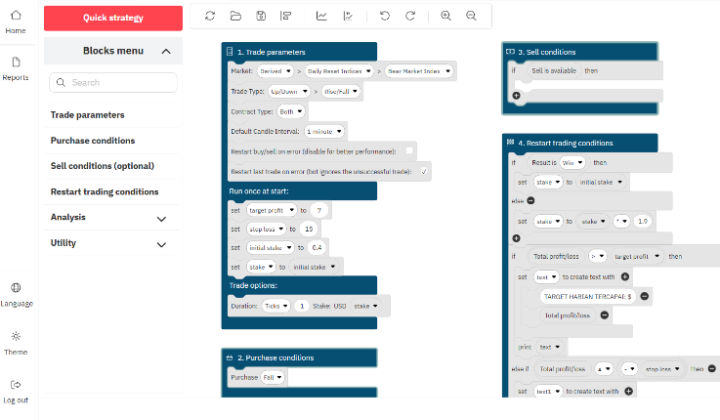
Now that you have that string of text, it’s time to head over to the DBot platform. If you have been building your blocks, you might have noticed a small red indicator or a ‘Not Connected’ message. That is our target.
In the DBot workspace, there is typically a gear icon or a ‘Connection’ tab. This is where you paste your deriv api token for dbot setup. Once you paste it and hit ‘Connect’ or ‘Authorize,’ you should see your balance pop up in the top right corner. That is the moment of truth. If the balance appears, the handshake was successful. You are no longer just looking at a script; you are looking at a live connection to the markets.
What to Do If It Fails
If you get an ‘Invalid Token’ error, don’t panic. I’ve been there dozens of times. Usually, it’s one of three things:
- Leading or Trailing Spaces: When you copied the token, you might have caught an extra space at the end. Try copying it again, being very careful with the selection.
- Scope Mismatch: You might have forgotten to check the ‘Trade’ box. If the bot tries to place a trade but only has ‘Read’ access, it will throw an error.
- Account Type: Ensure you aren’t trying to use a Demo token on a Real account or vice-versa. Deriv keeps these environments separate for your protection.
Security Best Practices for 2026
We are living in a time where digital assets are prime targets. Your API token is essentially a key to your wallet. Treat it with respect. I’ve seen people post screenshots of their DBot workspace on social media forums asking for help, and they accidentally leave their token visible in the background. That is a recipe for disaster.
Here’s a golden rule: Never share your token with anyone. Not even if someone claiming to be “support” asks for it. Real support will never need your API token to help you with your account. If you suspect someone has seen your token, go back to the API management screen and delete it immediately. You can always generate a new one in seconds.
The Importance of IP Whitelisting
One of the coolest features we have more widespread access to in 2026 is IP whitelisting for API keys. If you are running your bot from a fixed server (like a VPS), you can actually tell Deriv to only accept requests from that specific IP address. This means even if someone steals your token, they can’t use it from their own computer. It is an extra layer of armor that I highly recommend if you are trading with significant capital.
The Psychology of Automated Trading
Setting up the deriv api token for dbot setup is the technical hurdle, but there is a psychological hurdle that comes right after. Once that bot is connected, there is a temptation to let it run and walk away. While the API handles the execution, the market handles the reality.
The bot doesn’t know if there is a major geopolitical event or a sudden flash crash unless you have programmed it to react to those specific volatility spikes. Use the connectivity you’ve just established as a tool, not a replacement for your brain. I like to keep a tablet or a second monitor open with the live feed even when my bot is running. It’s about being an ‘active manager’ of your automation.
Testing and Optimization
Before you go live with your newly connected bot, please, for the love of your bank account, use the Virtual (Demo) account first. The beauty of the Deriv ecosystem is that you can generate a deriv api token for dbot setup specifically for your virtual account. This lets you see exactly how the bot behaves in live market conditions without risking a single cent.
Watch how it handles the ‘Trade’ scope. Does it execute at the speed you expected? Are there latency issues between the API call and the trade placement? In 2026, the latency is minimal, but it is always good to check. Only when you are 100% confident in the bot’s behavior should you switch over to a real account token.
Keeping Your Bot Healthy
API tokens don’t really ‘expire’ unless you delete them or change your account security settings, but it is a good habit to rotate them every few months. It’s like changing your password. It keeps the connection fresh and ensures that no old, forgotten scripts still have access to your account. I make it a point to audit my API list on the first of every quarter. It only takes five minutes, and it provides immense peace of mind.
Troubleshooting Advanced Connectivity Issues
Sometimes, the connection might drop. It’s rare, but it happens. If your bot suddenly stops executing, the first thing to check isn’t your strategy logic—it’s the token status. Log into the Deriv portal and see if the token is still listed as ‘Active.’ Occasionally, a platform update might require you to re-authorize your external apps. If you see your token is missing, just repeat the generation process we covered earlier.
Another thing to watch for is ‘Rate Limiting.’ If your bot is trying to make 50 requests a second, Deriv’s servers might temporarily block your token to protect the platform. Good bot design involves ‘throttling’—ensuring your script only asks for data or places trades when absolutely necessary. It’s about being a good citizen of the network.
Final Thoughts on Your Setup
Connecting your strategy to the markets through a deriv api token for dbot setup is a significant milestone in your trading journey. It represents the transition from manual clicking to systematic execution. It’s empowering to see your ideas take flight on their own, but it also carries a new level of responsibility.
Take your time with the setup. Double-check your scopes. Keep your keys private. And most importantly, keep learning. The tools we have in 2026 are more powerful than anything we had a decade ago, but they still require a steady hand at the helm. Once you have that token pasted and that green light flashing, you are ready to see what your strategy is truly made of. Good luck out there, and may the markets be in your favor.
”