
Breaking the Chains of Default Indicators
Let’s be honest: if you’ve spent any time at all on the Deriv platform, you probably have a bit of a love-hate relationship with DBot. On one hand, it’s a brilliant piece of engineering—allowing anyone to build a trading robot without needing a degree in computer science. On the other hand, you eventually hit that invisible ceiling. You know the one. It’s that moment when you have a killer strategy that relies on a specific technical setup, but you realize the default blocks only offer the basics like RSI, SMA, and Bollinger Bands.
In 2026, the trading landscape has become even more competitive. Standard indicators are often too lagging or too common to give you a real edge. This is where custom indicator integration deriv dbot becomes the ultimate game-changer. You don’t want to trade like everyone else, so why should your bot be limited to the same tools as everyone else? Moving beyond the presets is how you transition from a casual user to a systematic trader who actually understands the mechanics of their strategy.
I remember the first time I tried to recreate a specific Weighted Moving Average (WMA) logic that I had perfected on MT5. I looked at the DBot interface and thought, “Where is the upload button?” Spoiler alert: there isn’t one. But that’s actually a blessing in disguise because it forces you to understand the logic you’re trading. This guide is going to walk you through how to bridge that gap and achieve seamless integration for your unique trading ideas.
The Core Challenge of Custom Indicator Integration Deriv DBot
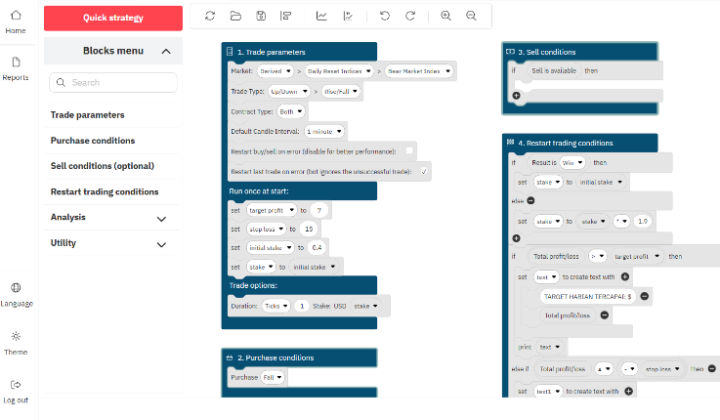
The first thing we need to address is the architectural reality of DBot. Unlike MetaTrader or TradingView, where you can simply drag and drop an .ex4 or .lua file, DBot operates on Google’s Blockly framework. This means that custom indicator integration deriv dbot isn’t about “installing” a file; it’s about “recreating” the mathematical formula of that indicator using the logic blocks provided.
Think of it like LEGO. If the kit doesn’t come with a pre-built window, you have to use smaller transparent bricks to make one yourself. It sounds tedious, but it gives you total control. You can tweak the smoothing, the period, and the sensitivity in ways a standard file would never allow. The challenge is primarily mathematical. Every indicator, no matter how complex, is just a series of calculations based on price (Open, High, Low, Close) and volume over time.

Why Blockly Isn’t as Scary as It Looks
Many traders get intimidated when they see the “Math” and “Logic” tabs in DBot. They prefer the plug-and-play nature of pre-built bots. But here’s the secret: most custom indicators are just variations of basic ones. A Supertrend is just ATR (Average True Range) combined with some median price calculations. A Hull Moving Average is just a combination of WMAs. Once you realize this, the process of custom indicator integration deriv dbot becomes much less about coding and more about recipe building.
A Step-by-Step Walkthrough for 2026 Traders
Let’s get into the weeds of how we actually make this happen. To integrate a custom setup, you need to follow a specific workflow. You can’t just throw blocks together and hope for the best. You need a structured approach to ensure your bot doesn’t lag or execute trades based on bad data.
Step 1: Deconstruct the Formula
Before you even touch a block, find the source code or the mathematical formula of the indicator you want to integrate. For example, if you’re looking for a specific volume-weighted calculation, you need to know exactly how it treats each candle. Write it down on paper. If the formula is (Price * Volume) / Total Volume, you now have your roadmap.
Step 2: Initialize Your Variables
In the “Variables” tab of DBot, create a new variable for every component of your formula. If you are doing custom indicator integration deriv dbot for something like a Chande Momentum Oscillator, you’ll need variables for ‘Current Gain’, ‘Current Loss’, and ‘Sum of Gains’. Setting these up early keeps your workspace clean and prevents the dreaded “undefined” errors that plague so many automated strategies.
Step 3: Accessing Historical Data
This is where most people trip up. Most custom indicators require data from previous candles (the ‘n’ period). In DBot, you use the “List” blocks to handle this. You need to create a list that stores the last 20, 50, or 100 candle closes. Every time a new candle forms, you push the newest price into the list and pop the oldest one out. This “sliding window” of data is the engine that powers your custom indicator.

The Power of External Data Streams
As we move through 2026, a new trend in custom indicator integration deriv dbot has emerged: using webhooks. If the math for your indicator is truly insane—perhaps involving machine learning or complex statistical analysis—recreating it in blocks might be impossible or simply too slow.
In these cases, advanced traders use a middleman. You can have your indicator running on a Python script or a TradingView alert, which then sends a signal to your DBot via a webhook. While this requires a bit more technical setup, it allows for a level of sophistication that was previously reserved for institutional hedge funds. It’s about making the bot work for you, rather than you working within the bot’s limitations.
Optimizing for Execution and Speed
One major pitfall when dealing with custom indicator integration deriv dbot is the issue of “block bloat.” If your logic is too heavy, the bot might take several milliseconds too long to process the data, leading to slippage or missed entries. In the fast-paced world of volatility indices, a few milliseconds is the difference between a win and a loss.
- Simplify your math: Instead of calculating the entire list every tick, see if you can update the value incrementally.
- Limit your history: Don’t keep 500 candles in a list if your indicator only needs the last 14.
- Use the ‘Run Once’ block: Some calculations only need to happen when a candle closes, not every single tick. Moving these into a “New Candle” logic block saves massive amounts of processing power.
Common Pitfalls and How to Dodge Them
I’ve seen hundreds of bots fail, and it’s rarely because the strategy was bad. It’s usually because the custom indicator integration deriv dbot was flawed. One common mistake is not accounting for “null” values. When your bot first starts, your data list is empty. If your indicator tries to calculate an average of 20 periods when only 2 candles have passed, it will crash. Always add a check: If (Length of List < Period) then (Wait).
Another issue is price feed synchronization. Deriv’s DBot can sometimes have slight variances in how it perceives a candle close compared to a separate MT5 terminal. Always ensure your bot is using the internal “Tick” or “Candle” data directly from the Deriv stream to ensure your custom calculations are perfectly synced with the execution engine.
The “Wait and See” Strategy
A mistake I made early on was being too aggressive with my custom signals. Just because you’ve successfully integrated a new indicator doesn’t mean you should let it run wild. I always recommend a 48-hour “monitoring phase” where you let the bot run on a demo account. Watch how the custom variables change in real-time. Use the “Notify” block to print the values of your custom indicator to the screen so you can verify they match your external charts. If your MT5 says the value is 75.4 and your DBot says 75.2, you know your logic needs a slight tweak.
The Future of Strategy Automation in 2026
We are living in an era where the barrier to entry for high-frequency and algorithmic trading is lower than ever. The ability to perform custom indicator integration deriv dbot is no longer just a “cool trick”—it’s a necessary skill for anyone serious about making a dent in the markets. We are seeing more community-shared logic blocks and more integration with external AI tools, making the DBot ecosystem more robust than it has ever been.
The beauty of this platform is its flexibility. While it looks like a simple tool for beginners, the underlying power is immense if you’re willing to do the legwork. You aren’t just a user; you’re an architect. Every time you successfully build a custom block, you’re adding a new tool to your professional arsenal that other traders simply don’t have.
Practical Example: Building a Trend-Filter
Let’s say you want to integrate a custom trend-filter that only allows trades if the price is above a certain volume-weighted average. You would first create a variable called `VWA_Sum`. You’d create a loop that runs through your price list and your volume list. Once that’s calculated, you’d wrap your entire purchase logic inside an `If` block that checks if `Current_Price > VWA_Sum`.
This simple piece of custom indicator integration deriv dbot can reduce your false signals by 30-40%. That’s the difference between a blowing an account and steady growth. It’s not about magic; it’s about math and the discipline to build it correctly.
Final Thoughts for the Aspiring Bot Developer
If you’re feeling overwhelmed, take a step back. You don’t need to build a complex multi-layered neural network on your first day. Start with something small. Maybe try to create a custom version of a Simple Moving Average that changes color based on the slope. Once you get that working, move on to more complex custom indicator integration deriv dbot projects.
The traders who succeed in 2026 are those who treat their bots like a craft. They refine, they test, and they never settle for the default settings. You have the tools, the platform, and now the knowledge of how to bridge the gap. The only thing left is to start dragging those blocks into place and seeing what your strategy is truly capable of when it’s no longer held back by standard limitations. Happy trading, and may your logic always be sound.